

Automatic Magnetic Loop Antenna Controller designed for the amateur-radio builder — precision loop tuning, automatic radio tracking and full local control.
What is Coverdrive?
Coverdrive is a build-it-yourself magnetic loop antenna controller designed to automate and simplify precision loop tuning.
The controller positions the loop’s tuning capacitor using precision stepper control. When radio tracking is used, CDSidekick Pro provides the required connection between the radio and Coverdrive so frequency changes can be followed automatically.
Coverdrive retains direct local control of motor movement, tuning, calibration and protection functions from the controller itself.
The bare Coverdrive PCB is available for $25.00. Firmware, CDSidekick Pro, schematic, bill of materials and complete documentation are provided FREE. Builders assemble the controller and source the components listed in the BOM. A 3D-printed enclosure is also available for $39.99.
Designed Around the Way a Magnetic Loop Operates
Coverdrive combines frequency-based tuning, precision motor positioning and independent local control in a dedicated magnetic loop antenna controller.
With CDSidekick Pro connected to the radio, Coverdrive follows frequency changes and moves the loop tuning capacitor toward the corresponding tuned position.
Frequency is the master reference. Motor position is mapped to operating frequency so tuning remains consistent across the configured band.
Stepper and position-feedback control provide accurate positioning of the vacuum-variable or butterfly tuning capacitor.
Operator-defined tuning anchors can be saved across the operating range, giving Coverdrive reference points for accurate frequency-to-position tracking.
Direct touchscreen and encoder controls allow the operator to move and tune the antenna manually whenever required.
Configured low and high operating limits define the safe movement range and help prevent travel beyond the calibrated limits.
Coverdrive provides advance awareness as motor position approaches the protected limits near either end of the configured range.
On restart, Coverdrive restores its frequency-position relationship without unnecessarily moving the tuning capacitor away from its existing resonant position.
Motor control, tuning, calibration, protection and manual operating functions run directly on the ESP32 controller. CDSidekick Pro is required when Coverdrive is to track the connected radio.
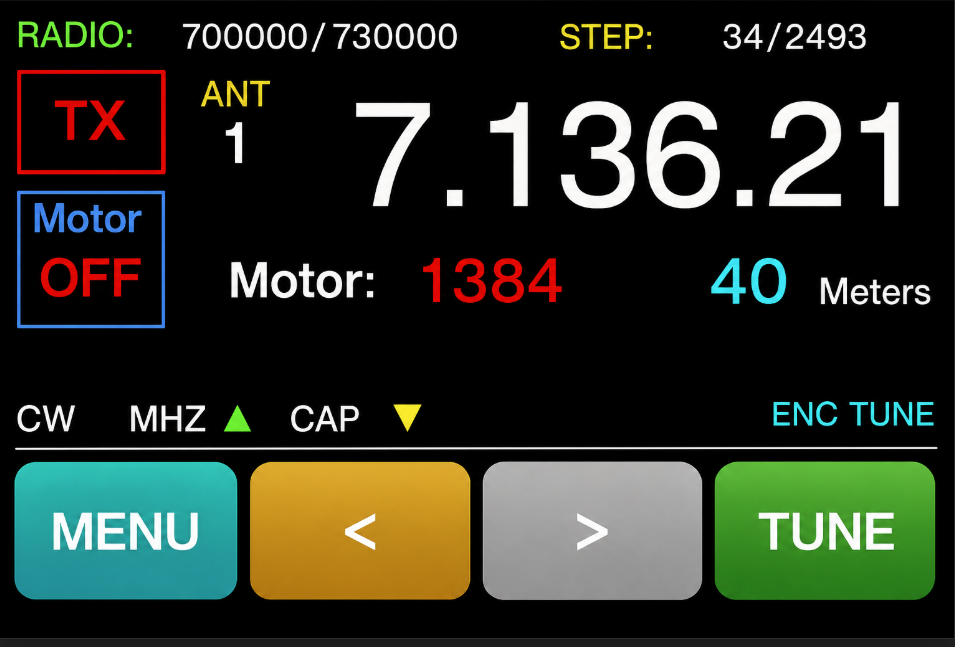
The controller displays operating information, motor status and tuning information while providing direct local controls.
Calibration establishes and maintains the relationship between the antenna tuning range, motor position and operating frequency.
CDSidekick Pro provides the required connection between the radio and Coverdrive. Using Omni-Rig, it reads the radio frequency and passes that information to Coverdrive for automatic tracking while also providing Windows monitoring and control.
The Coverdrive System
The finished Coverdrive combines the ESP32 controller hardware, precision loop-tuning system and CDSidekick Pro when radio integration and automatic radio-frequency tracking are required.
Touchscreen interface for monitoring, tuning and direct manual control.
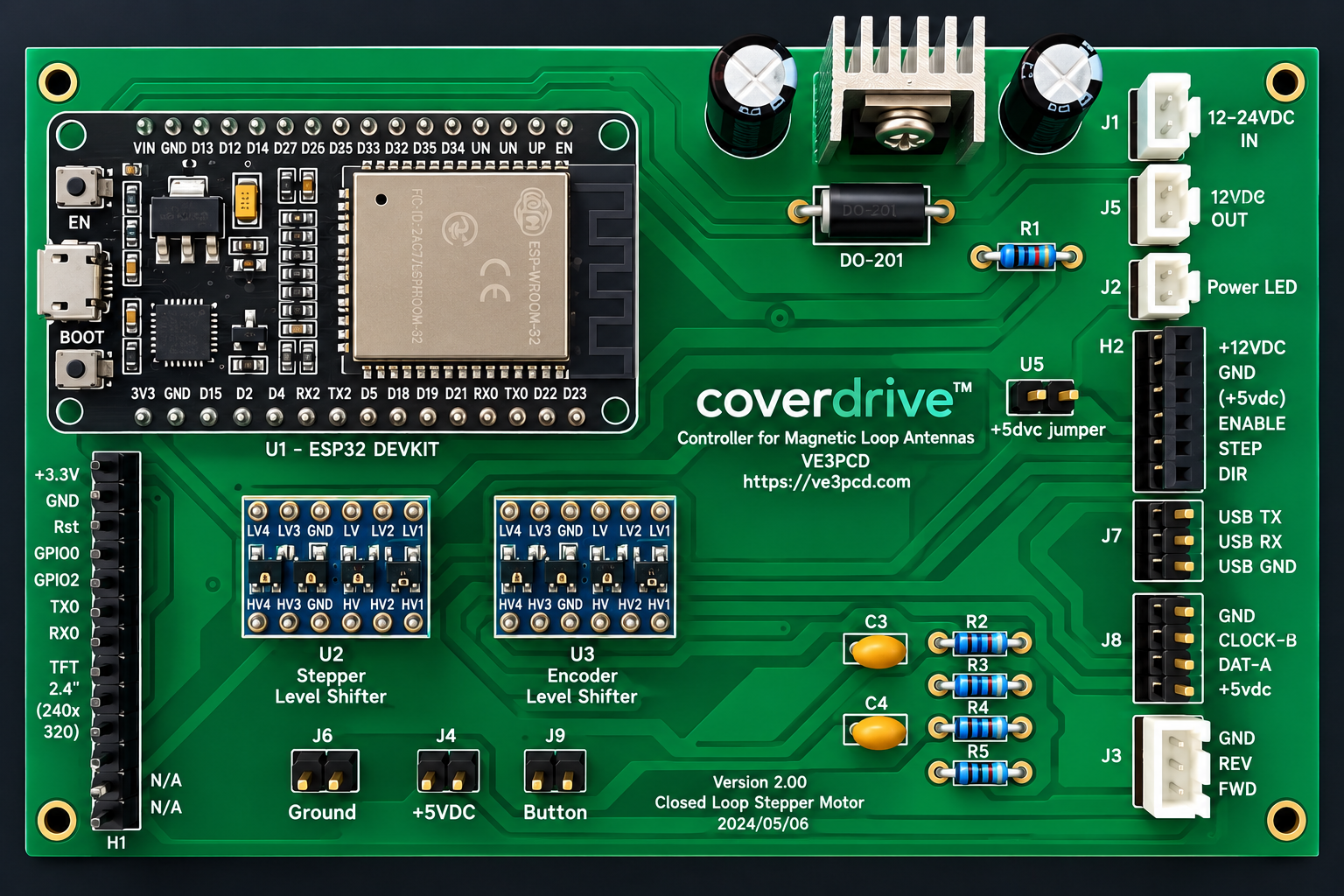
Custom ESP32-based controller providing the hardware interface for the stepper motor, position feedback and Coverdrive control system.
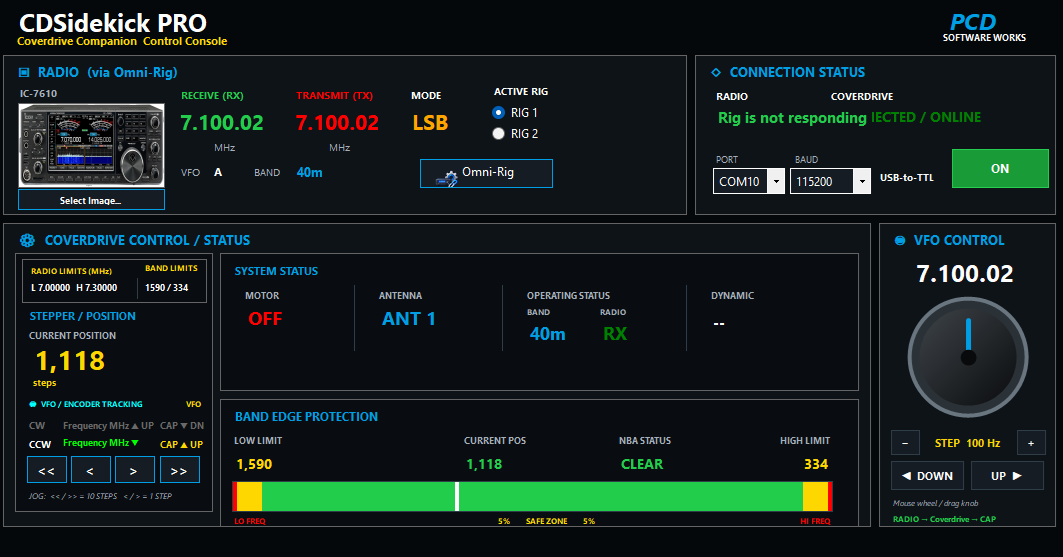
Required Windows radio bridge for automatic radio tracking, with Omni-Rig integration plus Coverdrive monitoring and control.
Everything You Need to Build Your Own Controller
Coverdrive is supplied as a builder project rather than a finished controller. Purchase the bare PCB, source the components from the supplied BOM and assemble the controller using the schematic and build documentation.
The purpose-designed bare PCB forms the foundation of the Coverdrive controller. The builder installs and assembles the required components.
Schematic, bill of materials, complete documentation, Coverdrive firmware and CDSidekick Pro are supplied FREE so the builder has the information and software needed to assemble, configure and operate Coverdrive.
A ready-made 3D-printed enclosure is available at additional cost for builders who prefer not to print or fabricate their own case.
From Bare PCB to Automatic Loop Tracking
After building the controller, Coverdrive is configured for the antenna and its tuning range. CDSidekick Pro and Omni-Rig are then used when automatic tracking of the connected radio is required.
Assemble the Coverdrive PCB using the supplied schematic, BOM and build documentation.
Load the supplied Coverdrive firmware onto the ESP32 controller and complete the initial controller configuration.
Connect the completed controller to the loop tuning system, including the stepper motor and required position-feedback hardware.
Establish the operating range and limits, then verify motor direction, movement and manual tuning from the controller.
For automatic radio tracking, install the supplied FREE CDSidekick Pro software and configure Omni-Rig for the connected transceiver.
Connect CDSidekick Pro to Coverdrive, verify that radio-frequency changes are being received correctly and begin automatic tracking.
Downloads
Download the software and documentation needed for coverdrive. These buttons use test packages while the release files are being prepared.
Controller firmware for the coverdrive ESP32 magnetic loop controller.
DOWNLOAD COVERDRIVE FIRMWARE v1.0coverdrive Firmware Version 1.0 is the current release.
Chrome Download Notice: Chrome may display a “Suspicious download” warning for the firmware package because it contains the flashing utility and installation scripts required to program the ESP32. If downloaded from this official PCD Software Works page, you may use Chrome’s option to continue the download.
Windows companion software required for radio connection and automatic radio tracking.
DOWNLOAD CDSIDEKICK PRO v1.0CDSidekick Pro Version 1.0 is the current release.
Complete coverdrive manuals, HOWTOs, diagrams and setup information.
DOWNLOAD DOCUMENTATION v1.00coverdrive Documentation Version 1.00 is the current release.
Build Your Own Coverdrive
Start with the purpose-designed bare Coverdrive PCB and build the controller using the supplied FREE firmware, CDSidekick Pro, schematic, bill of materials and documentation.
Purpose-designed bare PCB for builders assembling their own Coverdrive magnetic loop controller.
Available separately for builders who want a ready-made enclosure rather than printing or fabricating their own case.
Orders are initiated through the PCD Software Works Contact page. After the order is confirmed, PayPal payment instructions are provided privately. A complete shipping address is required for shipment of the PCB and/or enclosure.
CONTACT / ORDER INQUIRY